Windows 11? Is Redmond Crazy?

Folks have gotten used to Windows 10. Now Microsoft is pulling out the rug with a new version of Windows. When I heard of Windows 11, my first thought was that the disbanded Vista product team had staged an armed coup in Bill Gates’ old office and regained control of Windows. I haven’t installed Windows 11, although grandson Christopher has. He doesn’t like it.

I think Microsoft has something cooking in Windows 11.

Microsoft releases

New releases of Windows are always fraught. Actually, new releases of anything from Microsoft get loads of pushback. Ribbon menu anxiety in Office, the endless handwringing over start menus moving and disappearing in Windows. Buggy releases. It goes on and on.

Having released a few products myself, I sympathize with Microsoft.

Developers versus users

A typical IT system administrator says “Change is evil. What’s not broke, don’t fix. If I can live with a product, it’s not broke.” Most computer users think the same way: “I’ve learned to work with your run down, buggy product. Now, I’m busy working. Quit bothering me.”

Those positions are understandable, but designers and builders see products differently. They continuously scrutinize customers using a product, and then ask how it might work more effectively, what users might want to do that they can’t, how they could become more productive and add new tasks and ways of working to their repertoire.

Designers and builders also are attentive to advances in technology. In computing, we’ve seen yearly near-doubling of available computing resources, instruction execution capacity, storage volume, and network bandwidth. In a word, speed. 2021’s smartphones dwarf super computers from the era when Windows, and its predecessor, DOS, were invented.

No one ever likes a new release

At its birth, Windows was condemned as a flashy eye candy that required then expensive bit-mapped displays and sapped performance with intensive graphics processing. In other words, Windows was a productivity killer and an all-round horrible idea, especially to virtuoso users who had laboriously internalized all the command line tricks of text interfaces. Some developers, including me, for some tasks, still prefer a DOS-like command line to a graphic interface like Windows.

However, Windows, and other graphic interfaces such as X on Unix/Linux, were rapidly adopted as bit-mapped displays proliferated and processing power rose. Today, character-based command line interface are almost always simulated in a graphical interface when paleolithic relics like me use them. Pure character interfaces still are around, but mostly in the tiny LCD screens on printers and kitchen appliances.

Designers and builders envisioned the benefits from newly available hardware and computing capacity and pushed the rest of us forward.

Success comes from building for the future, not doubling down on the past. But until folks share in the vision, they think progress is a step backwards.

Is the Windows 11 start menu a fiasco? Could be. No development team gets everything right, but I’ll give Windows 11 a spin and try not to be prejudiced by my habits.

Weird Windows 11 requirements

Something more is going on with Windows 11. Microsoft is placing hardware requirements on Windows 11 that will prevent a large share of existing Windows 10 installations from upgrading. I always expect to be nudged toward upgraded hardware. Customers who buy new hardware expect to benefit from newer more powerful devices. Requirements to support legacy hardware are an obstacle to exploiting new hardware. Eventually, you have to turn your back on old hardware and move on, leaving some irate customers behind. No developer likes to do this, but eventually, they must or the competition eats them alive.

Microsoft forces Windows 11 installations to be more secure by requiring a higher level of Trusted Platform Module (TPM) support. A TPM is microcontroller that supports several cryptographic security functions that help verify that users and computers are what they appear to be and are not spoofed or tampered with. TPMs are usually implemented as a small physical chip, although they can be implemented virtually with software. Requiring high level TPM support makes sense in our increasing cybersecurity compromised world.

But the Windows 11 requirements seem extreme. As I type this, I am using a ten-year-old laptop running Windows 10. For researching and writing, it’s more than adequate, but it does not meet Microsoft’s stated requirements for Windows 11. I’m disgruntled and I’m not unique in this opinion. Our grandson Christopher has figured out a way to install Windows 11 on some legacy hardware, which is impressive, but way beyond most users and Microsoft could easily cut off this route.

I have an idea where Redmond is going with this. It may be surprising.

Today, the biggest and most general technical step forward in computing is the near universal availability of high capacity network communications channels. Universal high bandwidth Internet access became a widely accepted national necessity when work went online through the pandemic. High capacity 5G cellular wireless network are beginning to roll out. (What passes for 5G now is far beneath the full 5G capacity we will see in the future.) Low earth orbit satellite networks promise to link isolated areas to the network. Ever faster Wi-Fi local area networks offer connectivity anywhere.

This is not fully real. Yet. But it’s close enough that designers and developers must assume it is already present, just like we had to assume bit-mapped displays were everywhere while they were still luxuries.

What does ubiquitous high bandwidth connection mean for the future? More streaming movies? Doubtless, but that’s not news: neighborhood Blockbuster Video stores are already closed.

Thinking it through

In a few years, every computer will have a reliable, high capacity connection to the network. All the time. Phones are already close. In a few years, the connection will be both faster and more reliable than today. That includes every desktop, laptop, tablet, phone, home appliance, vehicle, industrial machine, lamp post, traffic light, and sewer sluice gate. The network will also be populated with computing centers with capacities that will dwarf the already gargantuan capacities available today. Your front door latch may already have access to more data and computing capacity than all of IBM and NASA in 1980.

At the same time, ransomware and other cybercrimes are sucking the life blood from business and threatening national security.

Microsoft lost the war for the smartphone to Google and Apple. How will Windows fit in the hyperconnected world of 2025? Will it even exist? What does Satya Nadella think about when he wakes late in the night?

Windows business plan

The Windows operating system (OS) business plan is already a hold out from the past. IBM, practically the inventor of the operating system, de-emphasized building and selling OSs decades ago. Digital Equipment, DEC, a stellar OS builder, is gone, sunk into HP. Sun Microsystems, another OS innovator, is buried in the murky depths of Oracle. Apple’s operating system is built on Free BSD, an open source Unix variant. Google’s Android is a Linux. Why have all these companies gotten out of or never entered the proprietary OS development business?

Corporate economics

The answer is simple corporate economics: there’s no money in it. Whoa! you say. Microsoft made tons of money off its flagship product, Windows. The key word is “made” not “makes.” Making money building and selling operating systems was a money machine for Gates and company back in the day, but no longer. Twenty years ago, when Windows ruled, the only competing consumer OS was Apple, which was a niche product in education and some creative sectors. Microsoft pwned the personal desktop in homes and businesses. Every non-Apple computer was another kick to the Microsoft bottom line. No longer. Now, Microsoft’s Windows division has to struggle on many fronts.

Open source OSs— Android, Apple’s BSD, and the many flavors of Linux— are all fully competitive in ease of installation and use. They weren’t in 2000. Now, they are slick, polished systems with features comparable to Windows.

To stay on top, Windows has to out-perform, out-feature, and out secure these formidable competitors. In addition, unlike Apple, part of the Windows business plan is to run on generic hardware. Developing on hardware you don’t control is difficult. The burden of coding to and testing on varying equipment is horrendous. Microsoft can make rules that the hardware is supposed to follow, but in the end, if Windows does not shine on Lenovo, HP, Dell, Acer, and Asus, the Windows business plunges into arctic winter.

With all that, Microsoft is at another tremendous disadvantage. It relies on in house developers cutting proprietary code to advance Windows. Microsoft’s competitors rely on foundations that coordinate independent contributors to opensource code bases. Many of these contributors are on the payrolls of big outfits like IBM, Google, Apple, Oracle, and Facebook.

Rough times

Effectively, these dogs are ganging up on Microsoft. Through the foundations— Linux, Apache, Eclipse, etc.—these corporations cooperate to build basic utilities, like the Linux OS, instead of building them for themselves. This saves a ton of development costs. And, since the code is controlled by the foundation in which they own a stake, they don’t have to worry about a competitor pulling the rug out from under them.

Certainly, many altruistic independent developers contribute to opensource code, but not a line they write gets into key utilities without the scrutiny of the big dogs. From some angles, the opensource foundations are the biggest monopolies in the tech industry. And Windows is out in the cold.

What will Microsoft do? I have no knowledge, but I have a good guess that Microsoft is contemplating a tectonic shift.

Windows will be transformed into a service.

Nope, you say. They’ve tried that. I disagree. I read an article the other day declaring Windows 11 to be the end of Windows As A Service, something that Windows 10 was supposed to be, but failed because Windows 11 is projected for yearly instead of biannual or more frequent updates. Windows 11 has annoyed a lot of early adopters and requires hardware upgrades that a lot of people think are unnecessary. What’s going on?

Windows 10 as a service

The whole idea of Windows 10 as a service was lame. Windows 10 was (and is) an operating system installed on a customer’s box, running on the customer’s processor. The customer retains control of the hardware infrastructure. Microsoft took some additional responsibility for software maintenance with monthly patches, cumulative patches, and regular drops of new features, but that is nowhere near what I call a service.

When I installed Windows 10 on my ancient T410 ThinkPad, I remained responsible for installing applications and adding or removing memory and storage. If I wanted, I could rename the Program Files directory to Slagheap and reconfigure the system to make it work. I moved the Windows system directory to an SSD for a faster boot. And I hit the power switch whenever I feel like it.

Those features may be good or bad.

As a computer and software engineer by choice, I enjoy fiddling with and controlling my own device. Some of the time. My partner Rebecca can tell you what I am like when a machine goes south while I’m on a project that I am hurrying to complete with no time for troubleshooting and fixing. Or my mood when I tried to install a new app six months after I had forgotten the late and sporty night when I renamed the Program Files directory to Slagheap.

At times like those, I wish I had a remote desktop setup, like we had in the antediluvian age when users had dumb terminals on their desks and logged into a multi-user computer like a DEC VAX. A dumb terminal was little more than a remote keyboard with a screen that showed keystrokes as they were entered interlaced with a text stream from the central computer. The old systems had many limitations, but a clear virtue: a user at a terminal was only responsible for what they entered. The sysadmin took care of everything else. Performance, security, backups, and configuration, in theory at least, were system problems, not user concerns.

Twenty-first century

Fast forward to the mid twenty-first century. The modern equivalent of the old multi-user computer is a user with a virtual computer desktop service running in a data center in the cloud, a common set up for remote workers that works remarkably well. For a user, it looks and feels like a personal desktop, except it exists in a data center, not on a private local device. All data and configuration (the way a computer is set up) is stored in the cloud. An employee can access his remote desktop from practically any computing device attached to the network, if they can prove their identity. After they log on, they have access to all their files, documents, processes, and other resources in the state they left them, or in the case of an ongoing process, in the state their process has attained.

What’s a desktop service

From the employees point of view, they can switch devices with abandon. Start working at your kitchen table with a laptop, log out in the midst of composing a document without bothering to save. Not saving is a little risky, but virtual desktops run in data centers where events that might lose a document are much rarer than tripping on a cord, spilling a can of Coke, or the puppy doing the unmentionable at home. In data centers, whole teams of big heads scramble to find ways to shave off a minute of down time a month.

Grab a tablet and head to the barbershop. Continue working on that same document in the state you left it instead of thumbing through old Playboys or Cosmos. Pick up again in the kitchen at home with fancy hair.

Security

Cyber security officers have nightmares about employees storing sensitive information on personal devices that fall into the hands of a competitor or hacker. Employees are easily prohibited from saving anything from their virtual desktop to the local machine where they are working. With reliable and fast network connections everywhere, employees have no reason to save anything privately.

Nor do security officers need to worry about patching vulnerabilities on employee gear. As long as the employee’s credentials are not stored on the employee’s device, which is relatively easy to prevent, there is nothing for a hacker to steal.

The downside

What’s the downside? The network. You have to be connected to work and you don’t want to see swirlies when you are in the middle of something important while data is buffering and rerouted somewhere north of nowhere.

However. All the tea leaves say those issues are on the way to becoming as isolated as the character interface on your electric teapot.

The industry is responding to the notion of Windows as a desktop service. See Windows 365 and a more optimistic take on Win365.

Now think about this for a moment: why not a personal Windows virtual desktop? Would that not solve a ton of problems for Microsoft? With complete control of the Windows operating environment, their testing is greatly simplified. A virtual desktop local client approaches the simplicity of a dumb terminal and could run on embarrassingly modest hardware. Security soars. A process running in a secured data center is not easy to hack. The big hacks of recent months have all been on lackadaisically secured corporate systems, not data centers.

It also solves a problem for me. Do I have to replace my ancient, but beloved, T410? No, provided Microsoft prices personal Windows 365 reasonably, I can switch to Windows 365 and continue on my good old favorite device.

Marv’s note: I made a few tweeks to the post based on Steve Stroh’s comment.

Computer Questions: Public Library Sessions

I know from other social media that folks are wondering about things that happen on their computers.

Answering computer questions may not be worth the in-person session risk, but they don’t go away. In fact, cybercrime is up during the pandemic. Two cyber attacks in late 2020 and early 2021 are larger and more significant than anything I have seen before. News that an physical attack on a Saudi oil refinery has sent gas prices up this week, and I am reminded that Saudi refineries have been the targets of cyberattacks.

In addition, I know from other social media that folks are wondering about things that happen on their computers. Some issues are annoying, like spam in your email, others are scary, like activity that suggests you’ve been hacked, to just plain terrifying, like extortionary fraudulent emails.

Computer questions answered at the Ferndale Public Library

Until the pandemic lockdown began in March of 2020, my grandson, Christopher, and I held one hour public sessions at the Ferndale Public Library twice a month to answer computer questions. During these sessions we offered to try to help folks with any kind of computer problem. The problems ranged from annoying but minor email settings issues to high level discussions of XML data structuring for application interfaces. Both Christopher and I miss these sessions. We both like to help people, and, I’ll be frank, I think we both get pleasure out of showing off the knowledge of computing that we have accumulated.

Now that the grip of the pandemic is beginning to loosen a little, the possibility of reopening those computer questions sessions arises. My wife and I have each gotten our first vaccine injection and expect, following CDC guidelines, to begin mixing more in April.

Most likely not until Fall 2021

However, I don’t think it is realistic to expect sessions at least until fall of 2021. The vaccine statistics so far show the vaccines are effective at protecting people who are vaccinated, but there is not yet strong evidence that the vaccines stop the spread of the virus. The folks who study the course of the virus don’t know how many people have to be vaccinated to prevent unvaccinated people from continuing to get sick at high rates.

Having all that hurt condensed into a single year is difficult to comprehend.

The big question is when will vaccination prevent the virus from continuing to trouble our nation and the world? We have been troubled. More people are dead in one year of covid than from WWII, the Korean War, and Vietnam combined. I’m old enough to know that those wars were hard on us. Having all that hurt condensed into a single year is difficult to comprehend.

For me, stopping the spread of the virus is as important as protecting myself. Until the spread is stopped, our economy will only limp along and none of us will live the lives we want and deserve. Therefore, I plan to do everything I can to stop the spread, not just keep myself and loved ones alive. That’s selfishness, not altruism!

On top of that, hands-on help with computer problems in a small conference room is probably one of the more hazardous things a person can do in the presence a deadly and contagious airborne virus. So we won’t be restarting in person sessions at the library until covid cases are down. Way down.

A new Computer Questions page

But I don’t want to leave folks in the lurch.

But I don’t want to leave folks in the lurch. Therefore, I’ve opened a “Computer Questions” page on this site. Just enter your questions in the Reply section of the page. I’ll get back to you in a comment or write a post if I think enough people will be interested.

I really hope this can become as lively, helpful, and as much fun as our sessions at the Ferndale Library.

SolarWinds Hack. Danger Will Robinson!

The SolarWinds hack is worrisome, but probably not for home computer users, although some caution is warranted. This week, the president of Microsoft, Brad Smith, declared the SolarWinds hack was the most sophisticated ever. Before we get to precautions, I’ll explain why the hack is such a big deal.

SolarWinds hack

“I’ve been following this story closely as it has unrolled, and, frankly, it gets worse every day.”

Supply chain hacks

I’ve been following the story closely as it has unrolled, and, frankly, it gets worse every day. It is what the industry calls a “supply chain hack,” an indirect attack on an element in a target’s supply chain.

Instead of striking the target directly— for example, the inventory management system used by the U.S. Treasury Bullion Depository at Fort Knox— the hacker attacks the development facilities of an externally developed product that Treasury uses, an element in the Treasury digital supply chain.

The external product development lab is probably far less protected than Fort Knox. After gaining access, the hackers write in a nasty bit of malware, then wait for the Treasury to install the hacked product. When the product is installed, the hacker has an open door into Fort Knox and can begin dispatching shipments of gold bullion to an off-shore warehouse, Free On Board by the U.S. Army.

I doubt that Fort Knox is vulnerable in the way I’ve described, but a supply chain hack is a method for getting into a highly secure system without confronting the measures put in place by an institution that is guarded like Fort Knox.

SolarWinds hack

SolarWinds, an enterprise software company whose products I once competed with, was an outstanding choice for a supply chain attack. In the last few years, SolarWinds network management system has become popular among Fortune 500 enterprises and government agencies, including the U.S. Treasury.

Network management systems are used to monitor and control computing equipment on a network. Any organization with more than a few dozen computing devices is almost certain to have some sort of network management installed and that system is likely to touch every computer in the organization.

Estimates are that 18,000 companies and government agencies have been infiltrated with vulnerable access points installed in an update to a SolarWinds product.

Personal experience

Personally, I have to think hard about this hack because I could have been a manager responsible for it. I was the technical leader in charge of products similar to SolarWinds. I made many decisions that affected the vulnerability of our products. Could my products have been infiltrated and subverted the same way SolarWinds was caught? I’ve been retired for almost ten years now, so be aware that anything I describe here is likely to have changed.

Nevertheless, I have to say yes. My projects could have been hacked. Quality assurance was a high priority. Some of our best customers were financial institutions and insurance companies who pushed us on security and we increased our security efforts with each release, but portions of our code were written before 2000 when security was not a high priority.

Also, hacking into development often has little connection with engineering. Dishonest, bribed or threatened employees, and rogue contractors all contribute to security vulnerability. Every large organization is bound to have a few bad eggs or weak links.

“In any large public corporation, the stock analysts often hold more sway than the security experts.”

And I must be honest. In any large public corporation, the stock analysts often hold more sway than the security experts. This is one reason I favor products that are certified secure with third party security audits. The best security audits include examination of both engineering and corporate governance, such as hiring procedures and controls on employee integrity. Stock analysts pay more attention to certification, especially certification by prestigious accounting and consulting firms, than opinions from security experts with qualifications a stock analyst probably knows nothing about.

Security at SolarWinds

“A key server is said to have been publicly accessible via a weak password “solarwinds123.”

Unfortunately, there are ample reports that SolarWinds security was poor. A key server is said to have been publicly accessible via a weak password “solarwinds123.” I have wandered computing convention show floors trying passwords like “oracle123” or “goibm” on unattended computers. In the early 2000s, those guesses quit working. Apparently, SolarWinds had some old timers setting passwords. Other poor security practices are said to have been common. Access to SolarWinds servers was also said to be on sale on the dark web.

Ironically, SolarWinds also develops and markets security auditing tools.

Origin of the SolarWinds hack

“I am reminded of the “mole” in author John le Carré’s 1974 spy novel Tinker Tailor Soldier Spy.”

Odds are great that it is a Russian government hack and more likely aimed at espionage and theft of plans and trade secrets than monetary gain. Which is good news for most home users, but the extent of the distribution of SolarWinds transported malware threatens both the U.S. government and economy. The U.S. may be dealing with this breach for years to come. I am reminded of the “mole” in author John le Carré’s 1974 spy novel Tinker Tailor Soldier Spy.

The bad news for home computer users is that criminal hackers may figure out ways to take advantage of the malware installed by the SolarWinds hack to gain access to software installed on home computers.

What to do?

Double down on basic computer security hygiene. I know that hygiene gets tedious, but criminals always go for the weakest victim. A few simple practices go a long way toward making a hack improbable. See my Six Rules for Online Security.

The SolarWinds hack underscores the importance of being careful when downloading and installing new software. Getting your software from established app stores, like the Microsoft Store, Google Play, or the Apple App Store is good practice because the stores vet the software they deliver. You still must be careful: malware has gotten through all of the stores. Software with tons of good reviews that has been downloaded frequently is safest. Never ever download anything from a site that does not show the https locked symbol on your browser. Check the reputation of your vendors and be sure you are on the real site, not a clever spoof.

Also, update your software regularly. Sign up for automatic updates whenever you can. The SolarWinds hack was spread by a software update, but that is not a reason to quit updating. The hack is also being neutralized by automatic updates and will be around far longer if folks neglect updates.

Run anti-malware regularly. The full extent and details of the hack are not yet known, but already anti-malware is cleaning up some of the mess.

Be sensible and be safe.

Free Digital Services: TANSTAAFL? Not Exactly

For the last two decades, we’ve been in an era of free services: internet searches, social media, email, storage. Free, free, free. My parsimonious head spins thinking of all that free stuff.

Social and technical tectonic plates are moving. New continents are forming, old continents are breaking up. Driven by the pandemic and our tumultuous politics, we all sense that our world is changing. 2025 will not return to 2015. Free services will change. In this post, I explain that one reason free digital services have been possible is they are cheap to provide.

I’m tempted to bring up Robert Heinlein, the science fiction author, and his motto, TANSTAAFL (There Ain’t No Such Thing As A Free Lunch), as a principle behind dwindling free services, but his motto does not exactly apply.

Heinlein’s point was that free sandwiches at a saloon are not free lunches because customers pay for the sandwiches in the price of the drinks. This is not exactly the case with digital free lunches. Digital services can be free because they cost so little, they appear to be free. Yes, you pay for them, but you pay so little they may as well be free.

A sandwich sitting beside a glass of beer costs the tavern as much as a sandwich in a diner, but a service delivered digitally costs far less than a physical service. Digital services are free like dirt, which also appears to be free, but it looks free because it is abundant and easily obtained, not because we are surreptitiously charged for it.

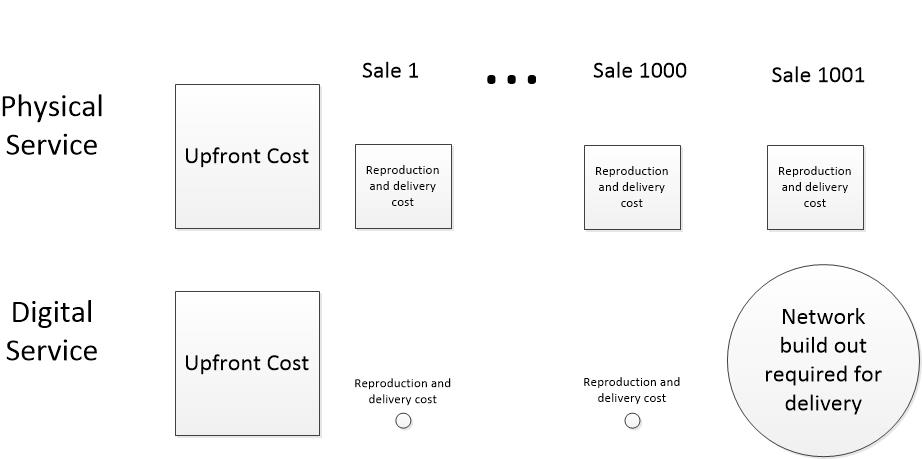
Each physical service sale has a fixed cost for reproduction and delivery. Digital services have almost no cost per sale for reproduction and delivery, until they have invest in expanded infrastructure.

Free open source software and digital services

One factor behind free digital services is the free software movement which began in the mid -1980s with the formation of the Free Software Foundation. The “free” in Free Software Foundation refers more to software that can be freely modified rather than to products freely given away, but most software under the Free Software Foundation and related organizations is available without charge. Much open source software is written by paid programmers, and is therefore paid for by someone, but not in ways that TANSTAAFL might predict.

The workhorse utilities of the internet are open source. Most internet traffic is Hyper Text Transmission Protocol (HTTP) packets transmitted and received by HTTP server software. The majority of this traffic is driven by open source Apache HTTP servers running on open source Linux operating systems. Anyone can get a free copy of Linux or Apache. Quite often, servers in data centers run only open source software. (Support for the software is not free, but that’s another story.)

So who pays for developing and updating these utilities? Some of the code is volunteer written, but a large share is developed on company time by programmers and administrators working for corporations like IBM, Microsoft, Google, Facebook, Amazon, and Cisco, coordinated by foundations supported by these same corporations. The list of contributors is long. Most large, and many small, computer companies contribute to open source software utilities.

Why? Because they have determined that their best interest is to develop these utilities through foundations like the Linux Foundation, The Apache Foundation, Eclipse Foundation, Free Software Foundation, and others, instead of building their own competing utilities.

By collaborating, they avoid wasting money when each company researches and writes similar code or places themselves in a vulnerable business position by using utilities built by present or potential competitors. It’s a little like the interstate highway system. Trucking companies don’t build their own highways, and, with the exception of Microsoft, computer companies don’t build their own operating systems.

Digital services are cheap

Digital services are cheap, cheaper than most people imagine. Free utilities contribute to the cheapness, but more because they contribute to the efficiency of service delivery. The companies that use the open source utilities the most pay for them in contributed code and expertise that amounts to millions of dollars per year, but they make it all back because the investment gives them an efficient standardized infrastructure which they use to build and deliver services that compete on user visible features that yield market advantages. They don’t have to compete on utilities that their customers only care about when they fail.

Value and cost of digital services are disconnected

We usually think that the cost of a service is in some way related to the value of the service. Digital services break that relationship.

Often, digital services deliver enormous value at minuscule cost, much lower cost than comparable physical services. Consider physical Encyclopedia Britannica versus digital Wikipedia, two products which offer similar value and functionality. A paper copy of Britannica could be obtained for about $1400 in 1998 ($2260 in 2021 dollars). Today, Wikipedia is a pay-what-you-want service, suggested contribution around $5 a month, but only a small percentage of Wikipedia users actually donate into project.

Therefore, the average cost for using Wikipedia is microscopic compared to a paper Britannica. You can argue that Encyclopedia Britannica has higher quality information than Wikipedia (although that point is disputable) but you have to admit that the Wikipedia service delivers a convenient and comparable service whose value is not at all proportional to its price.

Digital reproduction and distribution is cheap

The cost of digital services behaves differently than the cost of physical goods and services we are accustomed to. Compare a digital national news service to a physical national newspaper.

The up-front costs of acquiring, composing, and editing news reports are the same for both, but after a news item is ready for consumption, the cost differs enormously. A physical newspaper must be printed. Ink and paper must be bought. The printed items must be loaded on trucks, then transferred to local delivery, and hand carried to readers’ doorsteps. Often printed material has to be stored in warehouses waiting for delivery. The actual cost of physical manufacture and delivery varies widely based on scale, the delivery area, and operational efficiency, but there is a clear and substantial cost for each item delivered to a reader.

A digital news item is available on readers’ computing devices within milliseconds of the editor’s keystroke of approval. Even if the item is scheduled for later delivery, the process is entirely automatic from then on. No manpower costs, no materials cost, minuscule network delivery costs.

The reproduction and network delivery part of the cost of an instance of service is often too small to be worth the trouble to calculate.

My experience with network delivery of software is that the cost of reproducing and delivering a single instance of a product is so low, the finance people don’t want to bother to calculate it. They prefer to lump it into corporate overhead, which is spread across products and is the same whether one item or a million items are delivered. The cost is also the same whether the item is delivered across the hall or across the globe. Physical items are often sit in expensive rented warehouses after they are reproduced. Digital products are reproduced on demand and never stored in bulk.

Stepwise network costs

Network costs are usually stepwise, not linear, and not easily allocated to the number of customers served. Stepwise costs means that when the network infrastructure is built to deliver news items to 1000 simultaneous users, the cost stays the about same for one or 1000 users because much of the cost is a capital investment. Unused capacity costs about the same as used capacity— the capacity for the 1000th user must be paid for even though 1000th user will not sign on for months.

The 1001st user will cost a great deal, but after paying out to scale the system up to, say, 10,000 users, costs won’t rise much until the 10,001st user signs on, at which point another network investment is required. Typically, the cost increment for each step gets proportionally less as efficiencies of scale kick in.

After a level of infrastructure is implemented and paid for, increasing readership of digital news service does not increase costs until the next step is encountered. Consequently, the service can add readers for free without affecting adversely affecting profits or cash flow, although each free reader brings them closer to a doomsday when they have to invest to expand capacity.

Compare this to a physical newspaper. As volume increases, the cost per reader goes down as efficiency increases, but unlike a digital service, each and every new reader increases the overall cost of the service as the cost of manufacturing and distribution increases with each added reader. The rate of overall increase may go done as scale increases, but the increment is always there.

Combine the fundamental low cost of digital reproduction and distribution with the stepwise nature of digital infrastructure costs and digital service operators can offer free services much easily and more profitably than physical service providers.

The future

I predict enormous changes in free services in approaching months and years, but I don’t expect a TANSTAAFL day of reckoning because providing digital services is fundamentally much cheaper than physical services.

I have intentionally not discussed the ways in which service providers get revenues from their services, although I suspect most readers have thought about revenue as they read. The point here is that digital services are surprisingly cheap and their economic dynamics are not at all like that of physical goods and services.

As digital continents collide, I expect significant changes in free digital services, changes that will come mainly from the revenue side and our evolving attitudes toward privacy and fairness in commerce. These are a subjects for future posts.